Spring Shapes and Templates: A Design Asset for Every Season
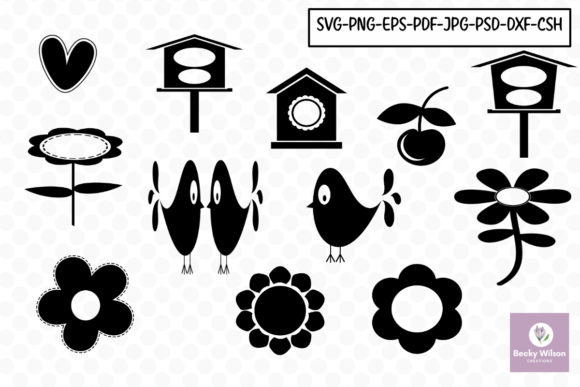
When the creative mood strikes, having the right tools at your fingertips makes all the difference. Spring Shapes and Templates is a versatile collection designed for makers, designers, and planners who need ready-to-use visuals that adapt to a wide range of projects. With 12 distinct shapes and templates provided in eight professional formats—DXF, EPS, JPG, PNG, SVG, PSD, PDF, and CSH—this resource is built for flexibility. Each file is delivered at 300dpi, ensuring crisp results whether you’re working on a digital layout or preparing a print-ready design.
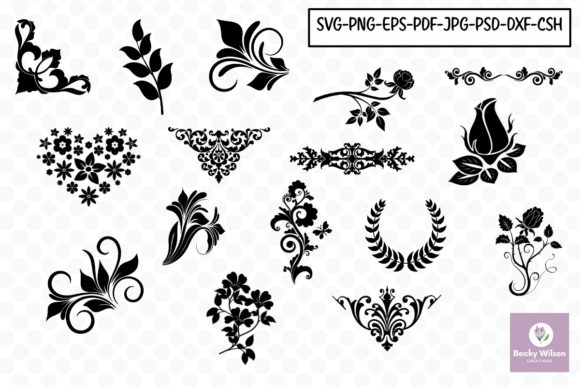
The visual personality of this collection leans into organic, seasonal motifs—think floral outlines, leaf silhouettes, and nature-inspired forms. These aren’t generic clip art; they’re clean, scalable vectors that hold their quality across sizes. The style strikes a balance between decorative and functional, making them suitable for both whimsical craft projects and polished professional work. There’s a lightness to the shapes that feels approachable without sacrificing refinement.
Where These Templates Truly Shine
One of the strengths of Spring Shapes and Templates is how naturally they fit into diverse workflows. For scrapbookers and journal enthusiasts, the shapes work beautifully as frames, borders, or standalone embellishments. Card makers will appreciate how quickly they can assemble invitations, thank-you notes, or holiday greetings. Wedding planners and stationery designers can use them to build cohesive suites—from save-the-dates to day-of signage—without starting from scratch.
Entrepreneurs and small business owners will find value in using these assets for packaging design, product tags, and social media graphics. The file formats included cover nearly every design software ecosystem: SVG for web and cutting machines, PSD for Photoshop users, EPS for Illustrator workflows, and DXF for CAD-based applications. This breadth means you won’t waste time converting files or troubleshooting compatibility issues.
For editorial design and publishing, the templates offer a fresh way to section break content, highlight quotes, or create visual interest in magazines and book layouts. Bloggers and content creators can integrate them into Pinterest graphics, email headers, or digital products like printable planners. The PNG files with transparent backgrounds are particularly handy for layering in design apps or quick social media posts.
Design Considerations and Practical Use
Working with shape-based assets requires a slightly different mindset than choosing a premium font or selecting a color palette. Shapes influence visual hierarchy by guiding the viewer’s eye, creating focal points, or adding rhythm to a layout. With Spring Shapes and Templates, the organic forms can soften a design that feels too rigid or add structure to one that’s overly freeform. They’re especially useful in logo design when you need a symbolic element that feels seasonal or nature-oriented.
When evaluating whether these assets fit your project, consider the emotional tone you’re aiming for. The shapes carry a fresh, optimistic quality—ideal for brands in wellness, beauty, gardening, or lifestyle spaces. They pair well with both serif fonts for a classic feel and sans serif fonts for a modern, clean look. If you’re working on a brand identity, think about how the shapes might extend across touchpoints: business cards, website icons, or packaging stickers.
A few practical tips: always test shapes at the actual size they’ll appear in your final design. What looks balanced as a thumbnail might feel crowded at full scale. Use the 300dpi files for print projects to avoid pixelation, and keep the vector formats on hand for anything that might need resizing later. If you’re layering shapes over photography or textured backgrounds, the PSD files with editable layers give you more control over blending and opacity.
Integrating Into Your Creative Workflow
The real value of a resource like Spring Shapes and Templates lies in how often you’ll reach for it. Having multiple formats means you can move seamlessly between projects—using SVG files for a website header one day and PDF templates for printed stationery the next. For crafters who use cutting machines, the DXF and SVG files are ready to go, saving hours of manual tracing.
If you’re building a library of design assets, look for opportunities to use these shapes beyond their obvious applications. A floral outline might become a watermark on a contract. A leaf template could serve as the basis for a pattern fill in a presentation slide. The CSH files—Photoshop custom shapes—let you quickly stamp motifs into digital paintings or mockups without disrupting your creative flow.
For those managing multiple projects or clients, consistency matters. Using the same set of shapes across a campaign helps reinforce brand recognition while keeping production efficient. Combine them with a cohesive color scheme and a well-chosen typeface, and you have a visual system that feels intentional without being complicated.
Ultimately, Spring Shapes and Templates is less about seasonal limitation and more about creative possibility. Whether you’re designing a wedding suite, building a product line, or refreshing your blog’s visual language, these assets offer a practical starting point that grows with your ideas. Keep them accessible, experiment with combinations, and let the shapes do what they’re designed to do—make your work a little easier and a lot more polished.