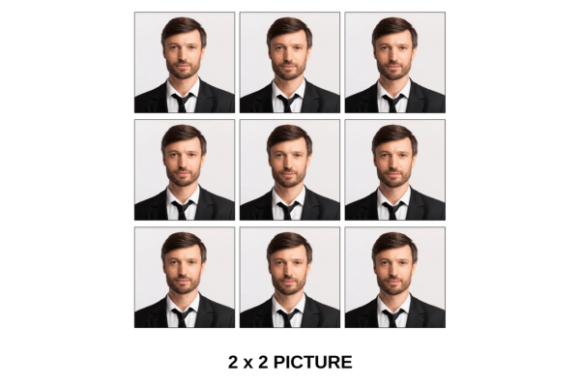
Stop Cropping Headaches: Master ID Photos with Frame Templates
Let’s be honest: resizing a headshot for a passport application, a company ID badge, or a creative portfolio can be a tedious guessing game. You upload a nice portrait, crop it to what you think is the right ratio, and suddenly the chin is cut off or the aspect ratio is rejected by the printer. This is where ID Photo/ Frame Templates step in to save your sanity. These aren't just static images; they are dynamic design assets built to handle the specific dimensional requirements of standard print sizes. By providing pre-set boundaries for everything from a tiny 1x1 inch square to a massive 10R print, these templates transform a chaotic editing process into a streamlined workflow.
The Practical Power of Standard Sizing
As a creative professional or business owner, consistency is your best friend. Whether you are a designer preparing assets for a client’s press kit or a small business owner creating staff badges, the visual hierarchy of your identification materials matters. The personality of these templates is strictly utilitarian but incredibly effective. They are designed with precision, ensuring that your focal point—the face—remains centered regardless of the output size. This collection of ID Photo/ Frame Templates covers the full spectrum of standard dimensions, including 2x2 (standard for US passports and visas), 2R, 3R, 4R, 5R, 6R, 8R, and 10R. Beyond personal identification, the inclusion of A4 and specific PASSPORT formats makes this an essential part of any modern typography and layout toolkit.
What makes this resource particularly appealing is its adaptability. It functions less like a rigid "font" in the traditional sense and more like a structural framework for your imagery. Think of it as the skeleton of your brand identity documents. When you standardize your employee photos using a 2x2 frame for the website and a 3R frame for internal records, you create a visual language of professionalism. It signals to your audience—whether they are customers, partners, or employees—that you value order and attention to detail.
Streamlining Your Workflow: How It Works
The beauty of these design assets lies in their simplicity, specifically optimized for platforms like Canva. You do not need to be a Photoshop wizard to achieve professional results. The mechanism is intuitive: you simply open the template file, select the specific frame size you need—be it a 5R for a portfolio piece or an A4 for a formal document—and drag your high-resolution photo into the designated area. The template handles the rest, automatically masking the image to fit the strict proportions of that size. This "drag and drop" functionality is a massive time-saver, particularly for marketers and content creators who need to process batches of headshots quickly for social media graphics or event programs.
However, to access this efficiency, there is one small prerequisite: you need to create a free account on Canva in order to access the file. Once you are in, the editing capabilities are vast. You can adjust the frame borders, tweak the background color to match your brand identity, and even add text overlays for ID cards. The versatility extends to the 6R, 8R, and 10R sizes, which are perfect for editorial design or packaging design where high-impact visuals are required. Imagine creating a "Meet the Team" wall in your office using 10R prints; the consistency provided by the template ensures that every photo aligns perfectly, creating a polished, high-end look without hiring a specialized studio photographer.
Visual Hierarchy and Brand Perception
In the world of design, the tools you use influence the final product's perception. While we often discuss serif fonts vs. sans serif fonts for readability, the framing of an image dictates its emotional impact. A tightly cropped 1x1 photo feels immediate and digital—perfect for Instagram profiles or forum avatars. Conversely, a 4R or 5R frame allows for more "breathing room," often used in formal portfolios or web design "About" pages to convey approachability and context.
For entrepreneurs and small business owners, these templates are more than just cutters; they are tools for brand perception. Using a PASSPORT template ensures you meet strict government regulations (like the 2-inch square requirement with specific headroom), preventing application rejections. Meanwhile, using the A4 template allows you to integrate headshots into proposals, invoices, or editorial design layouts seamlessly. The consistency of the framing acts as a visual anchor. Just as a premium font lends credibility to a logo, a perfectly framed, professionally cropped image lends credibility to the person in the photo.
Practical Guidance for Designers and Creators
When integrating these templates into your projects, consider the "font pairing" equivalent for images: context. A 2R image might look perfect on a business card but will look pixelated and lost on a poster. Always start with the highest resolution source image possible. This is crucial for the larger formats like 8R and 10R, where image quality degradation is noticeable.
Here is a practical checklist for using these assets effectively:
- Evaluate Project Fit: Are you creating a digital directory or a physical yearbook? A 3R size is often the sweet spot for physical yearbooks, while a 2x2 or 1x1 is better for digital directories.
- Test Visual Pairings: Don't just drop a photo in and export. Consider the background. If your brand uses a modern typography style with clean sans serif headers, ensure the photo background is neutral so the text doesn't clash.
- Review Layouts: Use the A4 template to create contact sheets. This is a lifesaver for crafters and hobbyists making trading cards or scrapbooks.
- Check Commercial Use: If you are using these for client work, ensure the licensing allows for commercial distribution of the final design (e.g., selling ID card templates).
Ultimately, the ID Photo/ Frame Templates collection is about removing friction from the creative process. It allows bloggers, designers, and publishers to focus on the creative aspects of their work—like expression and lighting—rather than getting bogged down in pixel math. By standardizing your approach to sizing, you ensure that every visual touchpoint, from a tiny 1x1 avatar to a formal PASSPORT submission, looks intentional, professional, and perfectly aligned with your goals.