Streamline Your Creative Process with Canva 10 Mood Board Templates
Every designer, brand strategist, or creative entrepreneur knows the struggle of the blank canvas. You have a vision for a brand identity, a marketing campaign, or a new product launch, but translating those abstract ideas into a cohesive visual direction can be a time-consuming bottleneck. This is where a well-structured mood board becomes your most valuable tool. It’s the bridge between concept and execution, and the Canva 10 Mood Board Templates are designed to build that bridge faster and with far greater professionalism.
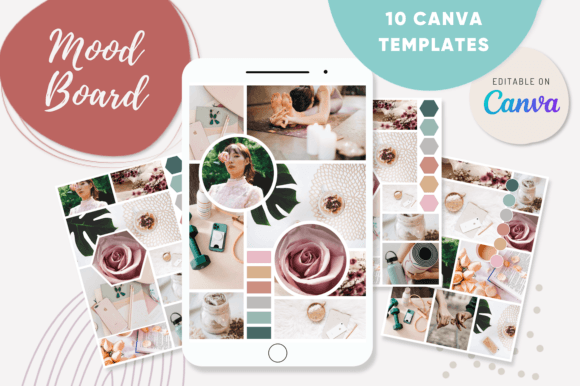
This collection isn't just a set of pretty frames. It's a practical toolkit comprising 10 distinct, fully editable templates and 10 completed examples to spark your imagination. The core appeal lies in its flexibility and user-centric design. Each template offers a unique layout—from dynamic, asymmetrical grids to clean, organized mosaics—allowing you to choose the structure that best communicates your project's personality, whether it's minimalist and modern or eclectic and vibrant. The visual style is intentionally diverse, ensuring you can find a foundation for a high-end serif font brand, a playful handwritten font identity, or a sleek sans serif font corporate profile.
Where These Mood Board Templates Excel
The true value of the Canva 10 Mood Board Templates is revealed in their application across a vast spectrum of projects. For a graphic designer, they are indispensable for presenting initial brand concepts to clients. Instead of describing a "warm, organic, and authentic" feel, you can assemble a board with curated images, color swatches, and texture samples in minutes, providing a concrete visual contract. This elevates the client conversation from subjective preference to objective strategy.
Entrepreneurs and small business owners will find them equally powerful for DIY branding. Crafting a strong brand identity starts with defining its visual language. These templates guide you through that process. Use the drag-and-drop functionality to add photos of your products, screenshots of inspiration, or textures that evoke your brand's ethos. The easy tools within Canva allow you to pull exact hex codes for your color palette, test how a logo design concept might sit within the composition, and experiment with typography pairings—all within the same project file. This creates a living brand guideline document from day one.
For marketers and content creators, the templates streamline the production of social media graphics and editorial design. Planning a quarterly content theme? Assemble a mood board that defines the photographic style, filter presets, typographic hierarchy, and color grading for all your upcoming posts. This ensures visual consistency across your feed, which is crucial for audience recognition and engagement. It’s a practical tool for maintaining a cohesive aesthetic on platforms like Instagram, Pinterest, and LinkedIn without the guesswork for every single post.
From Template to Professional Asset: A Practical Guide
Getting started is intentionally straightforward. After downloading the provided PDF, you'll access a single Canva project containing all 10 templates and the 10 example boards. The first step is to duplicate the template you want to use, preserving the original. Then, the intuitive interface takes over. Click on any placeholder image to upload your own files from your computer or select from Canva's vast library.
The editing tools are where you tailor the board to your specific project. Changing the background color is a single click. Adjusting the layout by moving or resizing the placeholder frames is done with simple drag handles. To incorporate your font pairing ideas, use the text tool to add headlines, subheads, and body copy samples directly onto the board. This is perfect for visualizing how a display font interacts with a serif font for long-form reading, or how a script font accent adds personality. You can test the readability of different typeface combinations in a realistic context, seeing them alongside the imagery and colors they'll be used with.
Consider this scenario: you're designing packaging design for a new artisanal coffee brand. Using one of the grid templates, you could place a photo of the coffee beans, a texture of the burlap sack, a color swatch of the deep brown roast, and a sample of the modern typography for the label. You could then add a mockup of the bag itself. This board becomes a North Star for every design decision, from the web design of the product page to the print materials at the point of sale, ensuring every touchpoint feels unified and intentional.
Remember, a mood board is a communication tool, not a final design. Its purpose is to capture the essence—the mood—through a curated selection of design assets. By using the Canva 10 Mood Board Templates, you bypass the technical hurdles of layout and composition, freeing up your mental energy to focus on the creative strategy. The result is a professional, polished visual brief that saves hours of work, aligns stakeholders, and provides a clear, inspiring foundation for any creative endeavor.