Vibrant Pinterest Templates: A Game-Changer for Visual Strategy
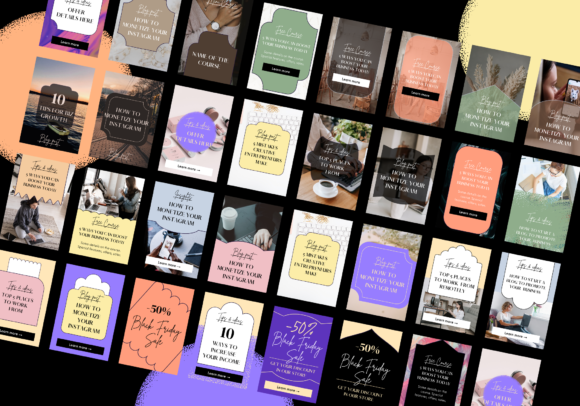
If you spend any amount of time managing a brand or a blog, you know that Pinterest is a visual search engine that demands consistency. However, maintaining that consistency while trying to churn out fresh content daily can feel like a grind. That is where these Vibrant Pinterest Templates come into play. Specifically designed with bloggers, business owners, and social media managers in mind, this pack offers a solution to the "blank canvas" paralysis. We are talking about 35 animated pin templates, sized perfectly at the standard 1000px by 1500px aspect ratio, designed to stop the scroll and drive traffic to your site.
The Power of Motion in a Static Feed
When we talk about modern typography and design assets, motion is no longer a luxury; it is a necessity. Pinterest’s algorithm and user behavior have shifted toward video and Idea Pins, but standard static pins still dominate the traffic game. The genius of these Vibrant Pinterest Templates lies in the animation. It is not over-the-top or distracting; rather, it is strategic. Subtle movements—a text block sliding in, a photo fading to reveal a headline, or a button pulsing gently—catch the eye of the scroller without overwhelming the message.
From a design perspective, the "vibrant" aspect of these templates is crucial. We are seeing a move away from beige minimalism toward bold, saturated colors and energetic layouts. This visual style communicates confidence and personality. For a brand identity, using these templates helps you establish a tone that feels alive and current. Whether you are a crafter showing off a new DIY project or a business owner launching a course, the energetic style of these design assets ensures your content doesn't just blend into the background noise of the feed.
Strategic Layouts for Maximum Engagement
One of the biggest challenges in editorial design and social media graphics is visual hierarchy. You have a split second to tell a user what the pin is about and why they should click. These Vibrant Pinterest Templates are structured to solve that problem. They utilize a mix of bold display font styles and clean sans serif font pairings to create contrast. This isn't just about looking pretty; it is about readability.
For example, a template might feature a large, handwritten font for the emotional hook—like "Summer Recipes"—paired with a sturdy, modern typography style for the details, such as "10 Quick Meals for Busy Families." This font pairing strategy is fundamental to effective marketing. It guides the reader’s eye from the headline to the subtext and finally to the call to action. As a creative professional, having these layouts pre-built means you don't have to reinvent the wheel every time you want to publish. You simply plug in your copy and your brand photos, and the visual hierarchy is already handled for you.
Practical Application Across Niches
The versatility of this pack is one of its strongest selling points. Because the templates are designed with a "vibrant" but neutral aesthetic, they adapt well to various industries. Let's look at how different professionals can leverage these assets:
- Bloggers and Publishers: If you run a food blog or a travel site, the animation can highlight the "best part" of your article. Use a slide-in effect to reveal the finished dish or the stunning destination. This mimics the feel of editorial design but in a social format.
- E-commerce and Packaging Design: Product-based businesses often struggle to show the scale or texture of their items on Pinterest. These templates allow you to mix lifestyle shots with text overlays that explain the benefits. You can use the templates to create a "collection" vibe, grouping products by color or theme, which reinforces your brand identity.
- Service Providers and Coaches: For those selling expertise, the "vibe" of your pins matters. You want to look professional but approachable. Using these Vibrant Pinterest Templates allows you to share tips, listicles, and testimonials with a level of polish that builds trust immediately. It signals that you care about the details, which translates to how you handle client work.
Evaluating Fit and Customization
When integrating any premium font or template pack into your workflow, you need to evaluate how it fits with your existing brand assets. The best way to approach these Vibrant Pinterest Templates is to view them as a skeleton. You need to apply your specific brand identity to them.
Start by reviewing the included styles. Are there enough layouts for your content types? You need templates for quotes, listicles, product features, and blog post promos. This pack of 35 offers a wide variety, which reduces the fatigue of posting the same layout over and over. Next, look at the font choices included in the templates. While the templates come with specific styles, most design software allows you to swap these out for your own brand fonts. If your brand uses a specific serif font for elegance, swap the headline. If you use a clean sans serif font for body text, ensure the placeholder text is legible at smaller sizes.
Technical Considerations for Best Results
Even the best design assets require some technical know-how to perform well. Since these are animated templates, file size matters. Pinterest favors fast-loading content. When you export your final designs, ensure you are optimizing the GIF or video file size without sacrificing too much quality. A crisp, clear image with a file size under 5MB is usually the sweet spot.
Readability is another key factor. While the "vibrant" aesthetic might tempt you to use busy backgrounds, always ensure there is enough contrast between your text and the image. If you place white text over a bright photo, use a dark overlay or a text box behind the words. The templates provided usually handle this well, but when you swap in your own photography, you must be vigilant. Check your pins on a mobile device before publishing. What looks like a balanced layout on a desktop monitor can look tiny and illegible on a smartphone screen.
Streamlining Your Content Workflow
Ultimately, the goal of using Vibrant Pinterest Templates is efficiency. As a business owner or content creator, your time is better spent on strategy, networking, and creation than on pixel-pushing in design software. By having a library of 35 animated templates at your disposal, you can batch your Pinterest content. You could create a month's worth of pins in a single afternoon.
This consistency also helps with brand recognition. When a user sees your pin in their feed, they will start to recognize your style—the specific color palette, the movement, and the typography. That recognition builds familiarity, and familiarity builds trust. In the crowded digital marketplace, trust is the currency that converts a casual scroller into a loyal reader or customer. These templates are not just about making things look good; they are about building a cohesive, professional presence that stands the test of time and trends. Level up your Pinterest game by embracing tools that prioritize both style and substance.